
Free youtube video thumbnail maker
Paste any YouTube video link and grab thumbnails in HD, SD, or Normal quality instantly.
How to Use
Simply paste the YouTube link above, click Get Thumbnails, and download in your preferred quality (HD, SD, or Normal).
FAQs
Q: Is this tool free?
A: Yes, it’s 100% free.
Q: Do I need to sign up?
A: No, you can use it instantly without registration.
About This Tool
This free online YouTube Thumbnail Downloader helps you grab HD, SD, and Normal-size thumbnails instantly, without watermarks.
Free youtube video thumbnail maker—FAQs
1. What is a thumbnail downloader for YouTube?
A Free YouTube video thumbnail maker is a free online tool that lets you create thumbnails quickly and easily. In just a few seconds, you can generate and save thumbnail images from any video. This tool automatically creates different versions of thumbnails in HD, SD, and lower-quality formats when a video link is added. Since YouTube doesn’t allow direct downloading, this tool provides the simplest and safest way to get thumbnails instantly. It’s useful for content creators, designers, bloggers, and researchers who want to study layouts, explore design ideas, or collect visuals for projects.
2. Benefits of Using a YouTube Thumbnail Downloader
When you use a Free YouTube video thumbnail maker, you’re not just creating an image—you’re learning what makes a thumbnail effective. This tool yourfreetool.com helps you understand color choices, font styles, and layouts that attract viewers. It’s helpful for YouTube creators, graphic design learners, and marketers who study how visuals boost engagement. Teachers, students, and bloggers can also use thumbnails for presentations, reports, or research
3. How to Use This Tool to Download YouTube Thumbnails ?
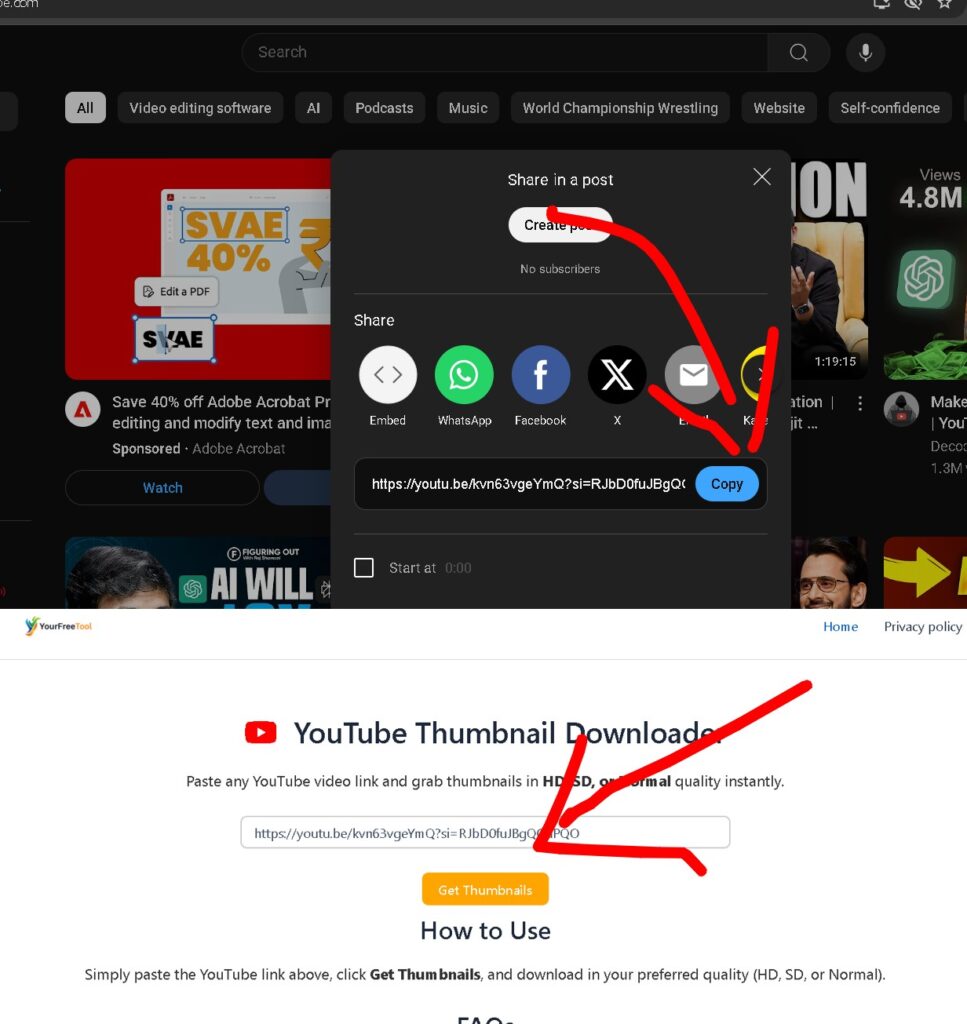
a) Copy the YouTube video URL.
b) Paste it into the input box on the website.
c) The tool will show available sizes like HD, SD, Medium, and Small.
d) Choose your preferred size and click “Download” to save the image.
e) Everything works online and no registration or software needed.
4. Can you choose from multiple sizes when using a free YouTube thumbnail maker?
1500×800 (HD) – Best for high-quality design or research use.
640×480 (SD) – Ideal for blogs and online use.
480×360 (Medium) – Great for web pages and smaller previews.
You can easily pick any size and download thumbnail from YouTube video without losing quality
5. Is It Safe to Use This Thumbnail Maker?
Yes, it’s completely safe to use this Free YouTube video thumbnail maker.
It works directly in your browser, requires no installation, collects no personal data, and keeps your privacy protected. It’s a secure and simple way to get thumbnails instantly
6. Do Thumbnails Have Copyright Restrictions?
You can download thumbnail from youtube video freely if it’s your own content. For other creators’ videos, use thumbnails only for learning or reference. Don’t reuse, edit, or sell them without permission, and always follow copyright and fair-use rules.
7. Why Should You Download Thumbnails From YouTube?
a) To use them as design inspiration for your next video.
b) To create marketing or promotional content using your own visuals.
c) To study how top creators make engaging thumbnails.
d) To add visuals in blogs, reports, or presentations.
e) To save or archive thumbnails for future reference.
8. Who Can Benefit from This Tool?
a) Content Creators – To improve thumbnail design or plan better visuals.
b) Students & Researchers – For study materials, analysis, or projects.
c) Bloggers & Journalists – To include video previews in articles.
d) Marketing Teams – To study how successful channels design thumbnails.
e) Educators – To explain how visuals impact audience engagement.
9. Can I Use This Tool for YouTube Shorts?
Currently, this Free YouTube video thumbnail maker works only for standard YouTube videos. Support for YouTube Shorts may be added in the future.